
Sales Invoice List Window
The Sales Invoice List window is the central module for managing and querying all sales transactions made by the company. Designed to offer a structured and operationally efficient view, it allows you to visualize the sales history, analyze its details, and execute key actions for documentary control and commercial flow continuity.
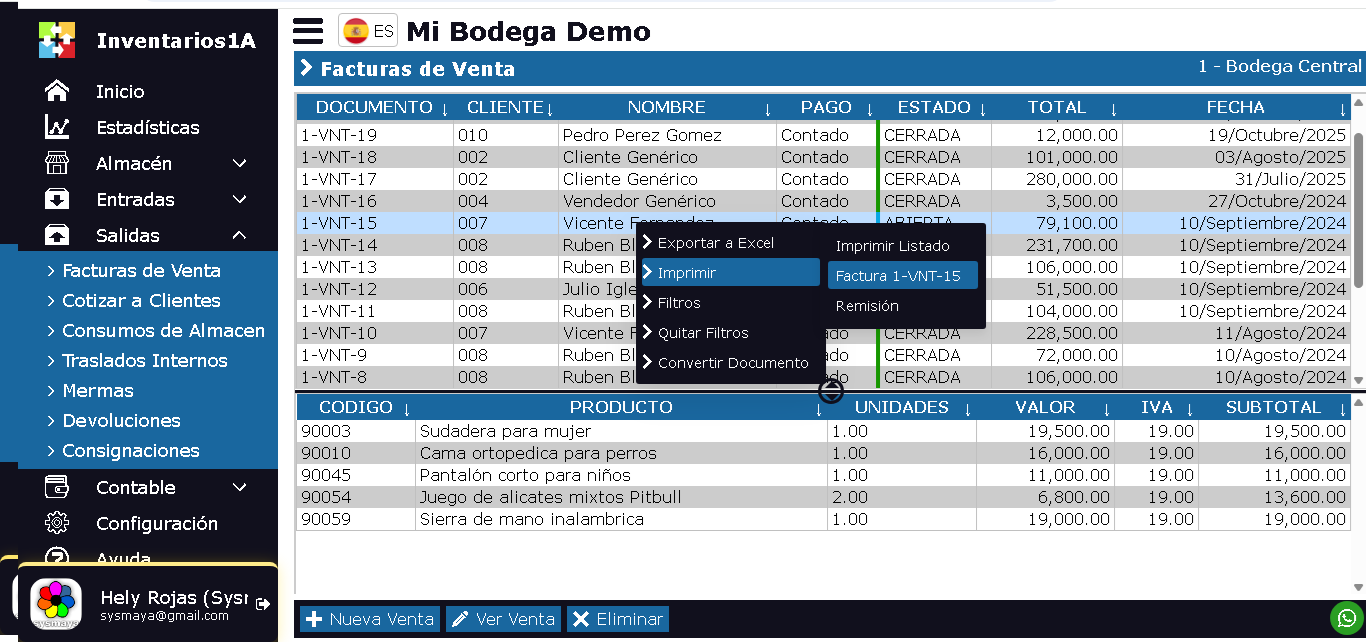
The Sales Invoice List window is designed to display all sales made by the company, divided into 2 sections.
- Upper section: Displays a list of Invoices, with document number, customer name, sale value, and date.
- Lower section: Displays all items sold from the selected sale. Product code, name, units, and sale value.
By right-clicking on the upper section, a pop-up menu appears with the following options:
- Export to Excel: This option generates a downloadable Excel file
- Print: Allows printing the sales list, the selected sales invoice, or the Remittance.
- Filters: Allows displaying only sales according to the user''s search criteria. By date, Customer, etc.
- Remove Filters
- Convert Document: Allows creating a new document from the selected document. The current document will not be modified. With this option, you can duplicate the sale, convert it into a transfer, quote, purchase order, etc.
At the bottom of the window, there are 3 buttons:
- New Sale: This option allows creating new Sales Invoices.
- View Sale: Opens the sale in Edit mode.
- Delete: Deletes the selected sales invoice. Only invoices that have not been finalized can be deleted.
Sales Invoice Life Cycle
The sales invoice has 2 states:
- OPEN: This state exists before finalizing and delivering the sold product. You can create the sale, save it to add products later.
- CLOSED: This state exists only after delivering the product. A Closed sale cannot be modified or deleted.
If after making and closing a sale, you want to correct it... You can''t. You will have to make the adjustment in Kardex, you can make a manual Kardex entry specifying something similar to: Kardex adjustment for error in sale xxx.