
Window List of Refunds by Sales
The Returns List by Sales window in Inventarios1A is the centralized control point for managing all merchandise returns made by customers. Designed to record, organize, and track products that return to inventory after a sale, this interface allows for a clear and audited view of each return process, ensuring the correct update of stock and reconciliation with accounts receivable.
This window is essential for closing the commercial relationship cycle when a product does not meet the customer''s expectations, whether due to defects, errors in the order, or changes of opinion within the agreed terms. From here, users can quickly access the return history, filter them by status (Pending, Verified, Approved, Processed), and perform an operational tracking that serves as the basis for issuing credit notes, quality analysis, and replenishment of available inventory.

The Returns List by Sales window is designed to display all merchandise entry documents generated by customer returns. This window is divided into 2 sections:
- Upper Section: Displays a list of Return documents, with key information such as: Document number, customer making the return, original sales document number (invoice, delivery note), return status, total value of returned merchandise, and creation date.
- Lower Section: Displays all returned items in the selected document. Includes: Product code, name, returned quantity, reason for return (defective, surplus, change, etc.), product condition (good, damaged), and warehouse location assigned to the entry.
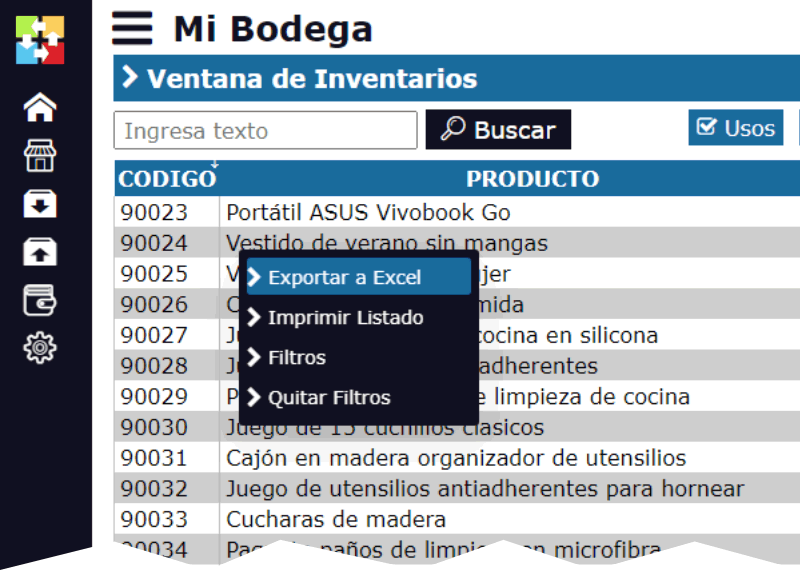
By right-clicking on the upper section, a pop-up menu appears with the standard options of Inventarios1A for list management:
- Export to Excel: This option generates a downloadable Excel file with the historical list of returns, useful for analyzing returns by customer, product, or salesperson.
- Print: Allows printing the list or the detail of a specific return for physical archiving or internal processing.
- Filters: Allows displaying only returns according to the user''s search criteria. Can be filtered by: Customer, original sales document, date range, return status, specific product, or salesperson.
- Remove Filters
In the lower part of the window, there are 3 specific action buttons:
- New Return: This option allows creating a new Return by Sales document. The process typically begins by selecting the original sales document (invoice) of the customer, which allows choosing the items to return directly from that order, ensuring complete traceability. Then, the quantities, reasons, and condition of the merchandise are recorded.
- View Return: Opens the selected return document in Edit mode (if it is in process) or View mode (if it is finished), allowing review of all its details, observations, and the history of the verification and approval process.
- Delete: Deletes the selected Return document. Only documents in DRAFT or PENDING status and that have not generated any inventory movement or associated financial document (such as a credit note) can be deleted. A processed return cannot be deleted.
Life Cycle of a Return by Sales in Inventarios1A
The Return document follows a flow of states designed to ensure control:
DRAFT / PENDING: Initial state. The document has been created, recording the customer''s intention to return, but the merchandise may not have been physically received or verified. Inventory has not been increased.
VERIFIED / IN WAREHOUSE: Intermediate state. The merchandise has been physically received in the warehouse, reviewed (quantity and condition), and the person in charge has confirmed the entry in the system. At this point, the inventory of products in "Good" condition is increased in the designated location.
APPROVED / CLOSED: Final state. The administrative and financial process has been completed. The return has been approved by the corresponding areas (management, finance), and, if applicable, the associated Credit Note has been generated for the customer. The document is for consultation only.
This module ensures that all inventory entries by customer returns are perfectly linked to the original sale, providing complete traceability, facilitating the analysis of return causes, and maintaining the integrity of both inventory and financial records.