
Quote List to Customers Window
The Customer Quote List window is the essential starting point for managing all pre-sale sales proposals. Designed to centralize and organize customer offers, this interface provides a comprehensive and up-to-date overview of each negotiation's status. From here, users can quickly access the quote history, filter quotes by status (pending, approved, or rejected), and perform efficient operational tracking that serves as the basis for sales forecasting and business planning.
This window not only facilitates consultation but also serves as the central module for executing key actions in the sales cycle. It allows you to generate new quotes from templates, review their full details, edit them before sending them to the client, and convert them directly into sales orders or invoices once approved. Its structured design ensures document control of proposals, optimizes sales response time, and guarantees a continuous workflow, transforming opportunities into concrete transactions.
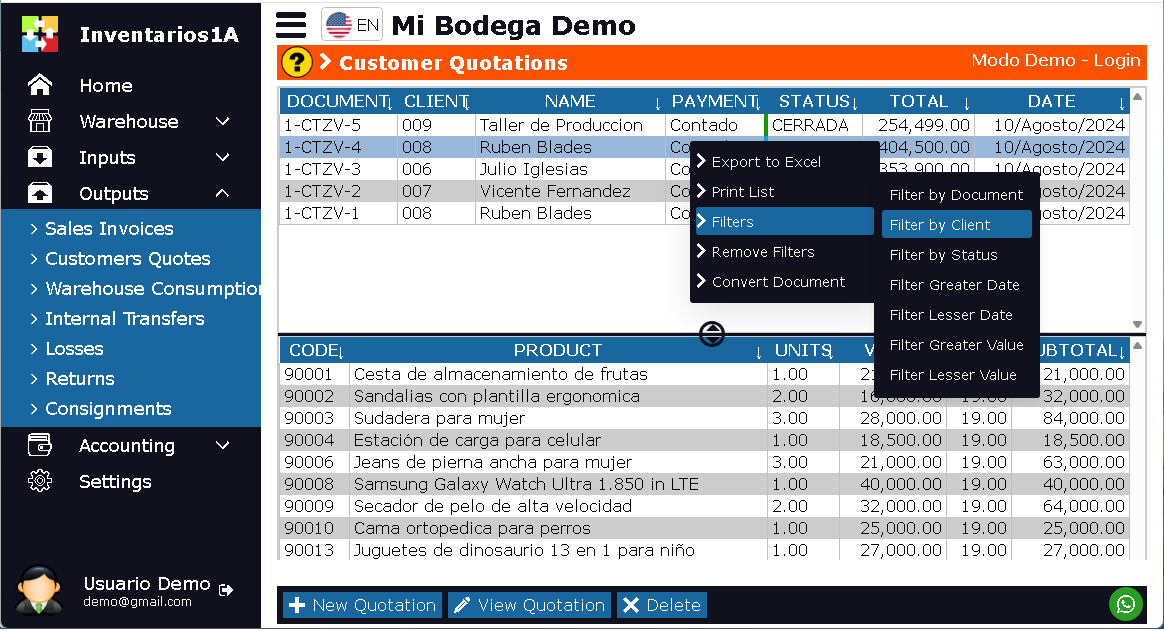
- Top section: Displays a list of quotes, with document number, customer name, sale value, and date.
- Bottom section: Displays all items quoted in the document. Product code, name, units, and sales value.
- Export to Excel: This option generates a downloadable Excel file
- Print: Allows you to print the list of quotes.
- Filters: Allows you to display only the quotes according to the user's search criteria. By date, client, etc.
- Remove Filters
- Convert Document: This allows you to create a new document from the selected document. The current document will not be modified. With this option, you can duplicate the quote or convert it into a transfer, sale, purchase order, etc.
- New Quote: This option allows you to create new quotes.
- View Quote: Opens the quote in Edit mode.
- Delete: Deletes the selected quote. Only documents that have not been finalized can be deleted.